Introduction
Our last release, version 1.1.3 was a pretty exciting release with new tools such as the chat program, link extractor, and various monitoring tools. This time we focused on adding host enumeration tools that can be useful when trying to discover information about a remote host. In addition, we have added a bulk search option that allows users to search on a list of items such as MD5 hashes, IP addresses or URLs for example. Here is what we have in store for you in version 1.1.4 which is now available for free via the Splunk App store.High Level
New Features in v1.1.4
- Updated Investigator Chat 2.0!
- Added Ping tool (Host --> Ping)
- Added SMB Share Viewer (Host --> SMB Share Viewer)
- Added NetBIOS Viewer (Host --> NetBIOS Viewer)
- Added Port scanner (Host --> Port Scanner)
- Added Banner grabber (Host --> Banner grabber)
- Added Bulk searching of data using any field (Toolbox -> Bulk Search - Wild)
- Added Bulk searching of data using a specific field (Toolbox -> Bulk Search - Field)
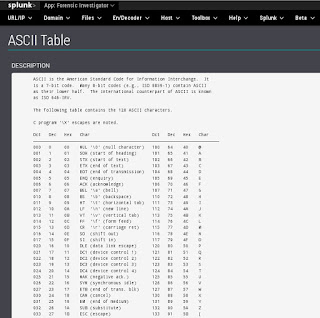
- Added ASCII Table cheatsheet (Toolbox -> Cheat sheets -> ASCII Table)
- Added Ports and services cheatsheet (Toolbox -> Cheat sheets -> Ports and Services)
- Added subnetting cheatsheet (Toolbox -> Cheat sheets -> Subnetting)
Maintenance in v.1.1.4
- Renamed the xml files to increase simplicity

- Updated Investigator Chat 2.0!
- Added Ping tool (Host --> Ping)
- Added SMB Share Viewer (Host --> SMB Share Viewer)
- Added NetBIOS Viewer (Host --> NetBIOS Viewer)
- Added Port scanner (Host --> Port Scanner)
- Added Banner grabber (Host --> Banner grabber)
- Added Bulk searching of data using any field (Toolbox -> Bulk Search - Wild)
- Added Bulk searching of data using a specific field (Toolbox -> Bulk Search - Field)
- Added ASCII Table cheatsheet (Toolbox -> Cheat sheets -> ASCII Table)
- Added Ports and services cheatsheet (Toolbox -> Cheat sheets -> Ports and Services)
- Added subnetting cheatsheet (Toolbox -> Cheat sheets -> Subnetting)
- Renamed the xml files to increase simplicity
Investigator Chat 2.0
The chat program received a pretty slick upgrade that makes it much more functional and easier to use. Big thanks to Kyle for that upgrade. It now lacks the annoying 5 second refresh rate.

Host Tools
Secure environments will lock down command prompts and restrict access to certain tools--thus it can be useful to have some host enumeration tools that can be activated through Splunk to query remote hosts.Ping Tool
This is the simplest tool to reach out and see if the host is alive. The assumption is that ICMP is not blocked at the network or host.


SMB Share Viewer
It can be nice to check for Windows shares as well. If run from Windows, it will use net view and will not see "hidden" shares (those that end in a $ sign, such as C$, ADMIN$, IPC$). If run from Linux, it will use smbclient and will see hidden shares.


NetBIOS Viewer
It is also useful to be able to pull NetBIOS table information from a remote host to determine function, users, domain and more.

Port Scanner
Determining the open ports can also be useful for determining the function of a host. Unfortunately, nmap or other port scanners may not always be available... so we provided a python based port scanner exposed through Splunk.


Banner Grabber
Taking it a step further, we added a python based banner grabber as well. It should be able to pull most banners, but let us know if it struggles against a particular service.


Bulk Searching - Wild and specific field
Often we have a large list of MD5 hashes, IP addresses, or URLs to run through Splunk. We could search one item at a time, but that is slow. We could create a complex boolean statement, but that takes time. How about just copying and pasting that list into a search field? Perfect! This has been tested with Chrome and Firefox which seems to work best. The file should contain one search item per line. When copied and pasted into the Splunk Search list field, the browser should separate the terms with spaces. There are two versions, one which you must specify the field and one that will search all fields (wild).


Cheatsheets - ASCII table, Ports and services, Subnetting
Finally, everyone can use some cheatsheets. Quick references such as an ASCII table, ports and services, and subnet information. No more wasting time searching the Internet--especially if you are on a closed network. These are now local references available in Splunk.

Conclusion
Hopefully you will enjoy the new features of the app. As always, we appreciate the great feedback we are receiving. Please send more ideas from within the app using Help --> Send Feedback.
