Showing posts with label SPL. Show all posts

Wednesday, November 27, 2019

Making Splunk Dashboards Available Outside of Splunk

By Tony Lee

Have you ever built a beautiful Splunk dashboard that was not only aesthetically pleasing, but also incredibly insightful? If so, maybe others learned of its value and now want that data shared--even to users who may not have Splunk accounts. We had such a case in which the Chief Information Officer (CIO) wanted to add a particular Splunk panel to his intranet site for all employees to see. In this article we will recreate the scenario and show you how this can be accomplished. The two screenshots below show two possibilities of embedding Splunk panels into external sites.

Figure 1:  Example of  a single panel embedded into a page outside of Splunk

Figure 2:  Example of two panels embedded into a page outside of Splunk

Problem

There are quite a few issues that we need to solve, such as:
  • Splunk does not make it easy to share panels and especially entire dashboards outside of their platform
  • Some data may be sensitive in nature, so just remember the potential audience
    • Fortunately, this sharing can be disabled if needed
  • This solution needs to be long-term low maintenance which means no manual updates
  • The new website must be able to reach the Splunk search head via HTTPS

Potential Solution

The potential solution we are going to show uses scheduled saved reports to share out a panel. Here are the steps below:

1) Generate your insightful panel using the proper search.  Click Save As > Report

Figure 3:  Creating a report

2)  Select the content and time range selector

Figure 4:  Saving the report

3) After saving the report, let's schedule it

Figure 5: Schedule the report

4) Specify the schedule - this example updates the report every hour with the last hour of data

Figure 6:  Schedule parameters

5) Generate the embedded link by clicking Edit > Embed

Figure 7: Generating the embedded link

6)  Copy the embedded iframe link into the external site in question (Example site shown in Demo Page Code section below)

Figure 8:  Embedded iframe link

Conclusion

This is one possible solution that creates a low maintenance panel shared outside of Splunk. If you want to share an entire dashboard, this can be repeated for every panel in the dashboard. Just be cautious of the sensitivity of the data. If it is later determined that this data is no longer needed or should not be shared, it can be disabled. If you have a different method of sharing panels and especially entire dashboards, we would love to hear it.  Feel free to post it in the comment section below and as always happy Splunking.

Demo Page Code

This is just a demo page that contains two embedded saved reports.  The panel on the left is a single value number and the one on the right is a timechart.  Just remember to replace the two locations of:  "YOUR_EMBEDDED_LINK_HERE"


<HTML>
<HEAD>
<TITLE>This is an embedded demo</TITLE>
<style type="text/css">
<!--
td {
  height: 300px;
  vertical-align: center;
  text-align: center;
}
iframe {
  vertical-align: center;
  text-align: center;
}
-->
</style>
</HEAD>
<BODY>

<center><h2>CIO's Corner</h2></center>

<table style="width:100%" border=1>
  <tr>
    <th>Total Count</th>
    <th>Count over Time</th> 
  </tr>
  <tr>
    <td width="25%" height=300><iframe frameborder="0" scrolling="no" src="YOUR_EMBEDDED_LINK_HERE"></iframe></td>
    <td width="75%" height=300><iframe height="100%" width="100%" frameborder="0" scrolling="no" src="YOUR_EMBEDDED_LINK_HERE"></iframe></td>
  </tr>
</table>

</BODY>
</HTML>


Tuesday, February 5, 2019

Splunk and ELK – Impartial Comparison Part I - Similarities


By Tony Lee

This series is not intended to start a “Big Data” holy war, but instead hopefully offer some unbiased insight for those looking to implement Splunk, ELK or even both platforms.  After all both platforms are highly regarded in their abilities to collect, parse, analyze, and display log data.  In fact, the first article in this series will show how the two competing technologies are similar in the following areas:
  • Purpose
  • Architecture
  • Cost

Caveat

Most articles on this subject seem to have some sort of agenda to push folks in one direction or another—so we will do our absolute best to keep it unbiased. We admit that we know Splunk better than we know the ELK stack, so we are banking on ELK (and even Splunk) colleagues and readers to help keep us honest. Lastly, our hope is to update this article as we learn or receive more information and the two products continue to mature.

Similar Purpose

Both Splunk and ELK stack are designed to be highly efficient in log collection and search while allowing users to create visualizations and dashboards.  The similar goal and purpose of the two platforms naturally means that many of the concepts are also similar.  One minor annoyance is that the concepts are referred to by different names.  Thus, the table below should help those that are familiar with one platform map ideas and concepts to the other.


Splunk
ELK Stack
Search Head
Kibana
Indexer
Elastic Search
Forwarder
Logstash
Universal Forwarder
Beats (Filebeat, Metricbeat, Packetbeat, Winlogbeat, Auditbeat, Heartbeat, etc.)
Search Processing Language (SPL)
Lucene query syntax
Panel
Panel
Index
Index


Similar Architecture

In many ways, even the architecture between Splunk and ELK are very similar.  The diagram below highlights the key components along with the names of each component in both platforms.

Figure 1:  Architectural similarities

Cost

This is also an area where there are more similarities than most would imagine due to a misconception that ELK (with comparable features to Splunk) is free.  While the core components may be free, the extensions that make ELK an enterprise-scalable log collection platform are not free—and this is by design.  According to Shay Banon, Founder, CEO and Director of Elasticsearch:

“We are a business. And part of being a business is the belief that those businesses who can pay us, should. And those who cannot, should not be paying us. In return, our responsibility is to ensure that we continue to add features valuable to all our users and ensure a commercial relationship with us is beneficial to our customers. This is the balance required to be a healthy company.”

Elastic does this by identifying “high-value features and to offer them as commercial extensions to the core software. This model, sometimes called ‘open core’, is what culminated in our creation of X-Pack. To build and integrate features and capabilities that we maintain the Intellectual Property (IP) of and offer either on a subscription or a free basis. Maintaining this control of our IP has been what has allowed us to invest the vast majority of our engineering time and resources in continuing to improve our core, open source offerings.”


That said, which enterprise-critical features aren’t included in the open source or even basic free license?  The subscription comparison screenshot found below shows that one extension not included for free is Security (formerly Shields).  This includes Encrypted communications, Role-based Access Control (RBAC), and even authentication.  Most would argue that an enterprise needs a login page and the ability to control who can edit vs. view searches, visualizations, and dashboards, thus it is not a fair comparison to say that Splunk costs money while ELK is free.  There are alternatives to X-PACK, but we will leave that to another article since it is not officially developed and maintained as part of the ELK stack.

Figure 2:  Encryption, RBAC, and even authentication is not free
In terms of host much Splunk costs vs. ELK, there are also many arguments there--some of which include the cost of build time, maintenance, etc.  It mostly depends on your skills to negotiate with each vendor.

Conclusion

Splunk and ELK stack are similar in many ways.  In fact, knowing one platform can help a security practitioner learn the other because many of the concepts are close enough to transfer.  The reduction in the learning curve is a huge advantage for those that need to convert from one platform to the other.  That said, there are differences, however we will discuss those in the next article.  In the meantime, we hope that this article was useful for you and we are open to feedback and corrections, so feel free to leave your comments below.  Please note that any inappropriate comments will not be posted—thanks in advance.  😊

Monday, April 24, 2017

Efficient Blue Coat (and other) Splunk Log Parsing

By Tony Lee

Special Notes

1)  This blog post does not only pertain to Blue Coat logs, but possibly other data sources as well.
2)  This is not a knock on Blue Coat, the app, TA, or any of that, it is just one example of many where we might want to change the way we send data to Splunk.  Fortunately Blue Coat provides the means to do so.  (hat tip)

Background info

A little while back, we were working on a custom Splunk app that included ingesting Blue Coat logs into a SOC's single pane of glass, but we were getting an error message of:

Field extractor name=custom_client_events is unusually slow (max single event time=1146ms)

The Splunk architecture was more than sufficient.  The Blue Coat TA worked great on small instances, but we found that it did not scale to a Blue Coat deployment of this magnitude.  The main reason for this error was the parsing in transforms.conf looked like this:

[custom_client_events]
REGEX = (?<date>[^\s]+)\s+(?<time>[^\s]+)\s+(?<duration>[^\s]+)\s+(?<src_ip>[^\s]+)\s+(?<user>[^\s]+)\s+(?<cs_auth_group>[^\s]+)\s+(?<x_exception_id>[^\s]+)\s+(?<filter_result>[^\s]+)\s+\"(?<category>[^\"]+)\"\s+(?<http_referrer>[^\s]+)\s+(?<status>[^\s]+)\s+(?<action>[^\s]+)\s+(?<http_method>[^\s]+)\s+(?<http_content_type>[^\s]+)\s+(?<cs_uri_scheme>[^\s]+)\s+(?<dest>[^\s]+)\s+(?<uri_port>[^\s]+)\s+(?<uri_path>[^\s]+)\s+(?<uri_query>[^\s]+)\s+(?<uri_extension>[^\s]+)\s+\"(?<http_user_agent>[^\"]+)\"\s+(?<dest_ip>[^\s]+)\s+(?<bytes_in>[^\s]+)\s+(?<bytes_out>[^\s]+)\s+\"*(?<x_virus_id>[^\"]+)\"*\s+\"*(?<x_bluecoat_application_name>[^\"]+)\"*\s+\"*(?<x_bluecoat_application_operation>[^\"]+)

The robustness and volume of data was simply too much for this type of extraction.

Solution

The solution is not to make Splunk adapt, but instead change the way data is sent to it. The Blue Coat app and TA require sending data in the bcreportermain_v1 format--which is an ELFF format. Then the Blue Coat app and TA try to parse this space separated data using the complex regex seen above. Instead of doing that, fortunately you can instruct Blue Coat to send the data in a different format such as key value pair--which Splunk likes and natively parses.

In this case, have the Blue Coat admins define a custom log format with the following fields:

Bluecoat|date=$(date)|time=$(time)|duration=$(time-taken)|src_ip=$(c-ip)|user=$(cs-username)|cs_auth_group=$(cs-auth-group)| x_exception_id=$(x-exception-id)|filter_result=$(sc-filter-result)|category=$(cs-categories)|http_referrer=$(cs(Referer))|status=$(sc-status)|action=$(s-action)|http_method=$(cs-method)|http_content_type=$(rs(Content-Type))|cs_uri_scheme=$(cs-uri-scheme)|dest=$(cs-host)| uri_port=$(cs-uri-port)|uri_path=$(cs-uri-path)|uri_query=$(cs-uri-query)|uri_extension=$(cs-uri-extension)|http_user_agent=$(cs(User-Agent))|dest_ip=$(s-ip)|bytes_in=$(sc-bytes)|bytes_out=$(cs-bytes)|x_virus_id=$(x-virus-id)|x_bluecoat_application_name=$(x-bluecoat-application-name)|x_bluecoat_application_operation=$(x-bluecoat-application-operation)|target_ip=$(cs-ip)|proxy_name=$(x-bluecoat-appliance-name)|proxy_ip=$(x-bluecoat-proxy-primary-address)|$(x-bluecoat-special-crlf)

Since this data comes into Splunk as key=value pair now, Splunk parses it natively.

We just removed the TAs from the indexer and replaced it with a simpler props.conf file of this:

[bluecoat:proxysg:customclient]
SHOULD_LINEMERGE = false

This just turns off line merging which is on by default and makes the parsing even faster. Also remember to rename the props.conf and transforms.conf (ex: .bak files) included in the app if you have it installed on your search head--that contains the same complicated regex which will slow down data ingestion. Lastly, by defining your own format, you can add other fields you care about--such as the target IP (cs-ip) which is not included in the default bcreportermain_v1 format for some reason. We hope this helps others that run into this situation.

Conclusion

Again, this issue is not isolated to Blue Coat, but to any data source that has the ability to change the way it sends data. We were quite happy to find that Blue Coat provides that ability and it certainly reduced the load on the entire system and gave back those resources for adding other data.  Hat tip to Blue Coat for providing the flexibility of custom log formats.  Happy Splunking!


Monday, June 6, 2016

Event acknowlegement using Splunk KV Store

By Tony Lee


Introduction

Whether you use Splunk for operations, security, or any other purpose--it can be helpful to be able to acknowledge events and add notes.  Splunk provides a few different methods to accomplish this task:  using an external database, writing to files, or the App Key Value Store (aka KV Store).  The problem with using an external database is that it requires another system to provision and protect and can add unwanted complexity.  Writing to files can be problematic in a distributed Splunk architecture that may use clustered or non-clustered components.  The last option is the Splunk KV Store which appears to be the current recommendation from Splunk, but this can also appear complex at first--thus we will do our best to break it down in this article.

In the most basic explanation, the KV Store allows users to write information to Splunk and recall it at a later time.  Furthermore, KV Store lookups can be used to augment your event data by mapping event fields to fields assigned in your App Key Value Store collections. KV Store lookups can be invoked through REST endpoints or by using the following SPL search commands: lookup, inputlookup, and outputlookup.  REST commands can require additional permissions, so this article will look at possibilities using the search commands.

References

Before we get started, we will list some references that helped in our understanding of the Splunk KV Store:
http://docs.splunk.com/Documentation/Splunk/latest/Knowledge/ConfigureKVstorelookups
http://docs.splunk.com/Documentation/Splunk/latest/SearchReference/Outputlookup
http://docs.splunk.com/Documentation/Splunk/latest/SearchReference/Inputlookup
http://docs.splunk.com/Documentation/Splunk/latest/SearchReference/Lookup

Deciding on the fields

For this example, we wanted to add a couple of fields to augment our event data.  Namely an acknowledgement field (we will call this Ack) and a notes field (we will call this Notes).  We will match the unique event id field with a field that is also called id.

So, in summary, we have id, Ack, and Notes.  Splunk also uses an internal _key field, but we will not reference this directly in our efforts.

Getting started

Per our references above on configuring KV Store lookups, we will need two supporting configurations:

  1. A collections.conf file specifying our collection name
  2. A stanza in transforms.conf to specify kvstore parameters

cat collections.conf 
#
# Splunk app KV Store collection file
#
[acknotescoll]


head transforms.conf 

[acknotes]
external_type = kvstore
collection = acknotescoll
fields_list = _key, id, Ack, Notes

Interacting with KV Store using search

The reference links provide helpful examples, but they do not provide everything necessary.  Some of this was discovered through a bit of trial and error.  Especially the flags and resulting behavior.  We list below the major actions that can be taken and the search commands necessary to perform those actions: 

Write new record:
| localop | stats count | eval id=101 | eval Ack="Y" | eval Notes="These are notes for event 101"| outputlookup acknotes append=True

Note:  Without append=True, the entire KV Store is erased and only this record will be present


Update a record (only works if the record already exists):
| inputlookup acknotes where id="100" | eval Ack="N" | eval Notes="We can choose not to ack event 100" | outputlookup acknotes append=True

Note:  Without append=True, the entire KV Store is erased and only this record will be present


Read all records:
| inputlookup acknotes


Read a record (A new search):
| inputlookup acknotes where id="$id$" | table _key, id, Ack, Notes


Read a record (combined with another search):
<search> | lookup acknotes where id="100" | table _key, id, Ack, Notes

Limitation and work around

Unfortunately, it does not look like Splunk has a single search command/method to update a record, but create the record if it does not already exist.  I may be mistaken about this and hope that I am missing some clever flag, so feel free to leave comments in the feedback section below.  To get around this limitation, we first created a "simple" search command to check for the existence of a record.

Determine if record exists:
| inputlookup acknotes where id="108" | appendpipe [stats count | where count==0] | eval execute=if(isnull(id),"Record Does Not Exist","Record Exists!") | table execute

Example of a record that exists


Example of record that does not exist


Conditional update:
Now that we can determine if a record exists and we know how to create a new record and update an existing record, we can combine all three to modify and/or create entries depending on their existence.

<query>| inputlookup acknotes where id="$id$" | appendpipe [stats count | where count==0] | eval execute=if(isnull(id),"| localop | stats count | eval id=$id$ | eval Ack=\"$Ack$\" | eval Notes=\"$Note$\" | outputlookup acknotes append=True","| inputlookup acknotes where id=\"$id$\" | eval Ack=\"$Ack$\" | eval Notes=\"$Note$\" | outputlookup acknotes append=True") | eval kvid=$id$ | eval kvack="$Ack$" | eval kvnote="$Note$" | eval Submit="Click me to Submit" | table kvid, kvack, kvnote, execute, Submit</query>

Results

These are just some examples of what is possible.

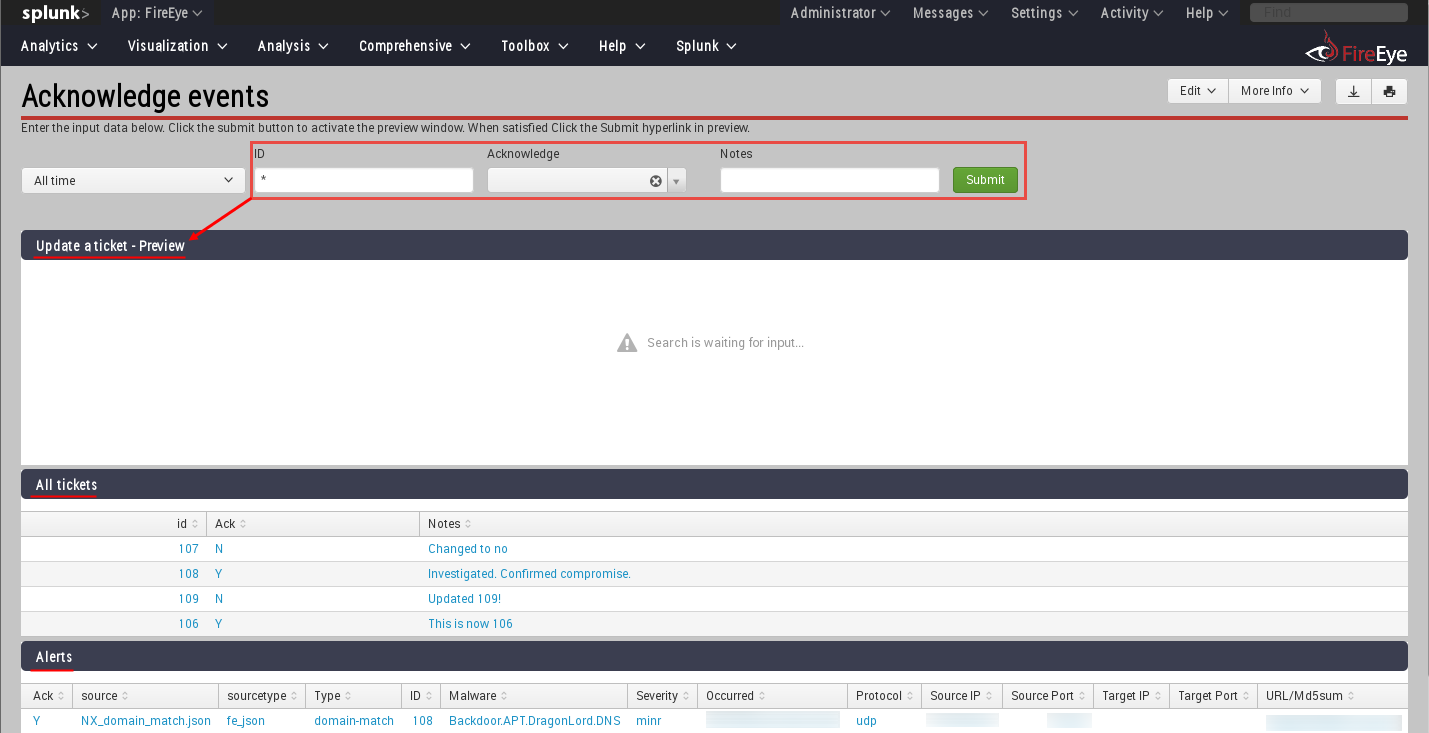
You could create an event acknowledgement page

Event acknowledgement page

Once the fields are filled in at the top with the event id, acknowledgement, and notes, it could create the command to either update or add a new entry to the KV Store.  Clicking the Submit hyperlink will actually run that command and modify the KV Store.

Event acknowledgement page filled out and waiting for click to submit

Once the data is populated in the KV Store, these records can be mapped to the original events to add this data for analysts.

Original event data with KV Store augmentation

Conclusion

Hopefully this helps expose some of the interesting possibilities of using Splunk's KV Store to create an event acknowledgement/ticketing system using search operations.  Feel free to leave feedback below--especially if there is an easier search operation for updating a record and adding a new one if it does not already exist.  Thanks for reading.