Showing posts with label Software. Show all posts

Monday, June 6, 2016

Event acknowlegement using Splunk KV Store

By Tony Lee


Introduction

Whether you use Splunk for operations, security, or any other purpose--it can be helpful to be able to acknowledge events and add notes.  Splunk provides a few different methods to accomplish this task:  using an external database, writing to files, or the App Key Value Store (aka KV Store).  The problem with using an external database is that it requires another system to provision and protect and can add unwanted complexity.  Writing to files can be problematic in a distributed Splunk architecture that may use clustered or non-clustered components.  The last option is the Splunk KV Store which appears to be the current recommendation from Splunk, but this can also appear complex at first--thus we will do our best to break it down in this article.

In the most basic explanation, the KV Store allows users to write information to Splunk and recall it at a later time.  Furthermore, KV Store lookups can be used to augment your event data by mapping event fields to fields assigned in your App Key Value Store collections. KV Store lookups can be invoked through REST endpoints or by using the following SPL search commands: lookup, inputlookup, and outputlookup.  REST commands can require additional permissions, so this article will look at possibilities using the search commands.

References

Before we get started, we will list some references that helped in our understanding of the Splunk KV Store:
http://docs.splunk.com/Documentation/Splunk/latest/Knowledge/ConfigureKVstorelookups
http://docs.splunk.com/Documentation/Splunk/latest/SearchReference/Outputlookup
http://docs.splunk.com/Documentation/Splunk/latest/SearchReference/Inputlookup
http://docs.splunk.com/Documentation/Splunk/latest/SearchReference/Lookup

Deciding on the fields

For this example, we wanted to add a couple of fields to augment our event data.  Namely an acknowledgement field (we will call this Ack) and a notes field (we will call this Notes).  We will match the unique event id field with a field that is also called id.

So, in summary, we have id, Ack, and Notes.  Splunk also uses an internal _key field, but we will not reference this directly in our efforts.

Getting started

Per our references above on configuring KV Store lookups, we will need two supporting configurations:

  1. A collections.conf file specifying our collection name
  2. A stanza in transforms.conf to specify kvstore parameters

cat collections.conf 
#
# Splunk app KV Store collection file
#
[acknotescoll]


head transforms.conf 

[acknotes]
external_type = kvstore
collection = acknotescoll
fields_list = _key, id, Ack, Notes

Interacting with KV Store using search

The reference links provide helpful examples, but they do not provide everything necessary.  Some of this was discovered through a bit of trial and error.  Especially the flags and resulting behavior.  We list below the major actions that can be taken and the search commands necessary to perform those actions: 

Write new record:
| localop | stats count | eval id=101 | eval Ack="Y" | eval Notes="These are notes for event 101"| outputlookup acknotes append=True

Note:  Without append=True, the entire KV Store is erased and only this record will be present


Update a record (only works if the record already exists):
| inputlookup acknotes where id="100" | eval Ack="N" | eval Notes="We can choose not to ack event 100" | outputlookup acknotes append=True

Note:  Without append=True, the entire KV Store is erased and only this record will be present


Read all records:
| inputlookup acknotes


Read a record (A new search):
| inputlookup acknotes where id="$id$" | table _key, id, Ack, Notes


Read a record (combined with another search):
<search> | lookup acknotes where id="100" | table _key, id, Ack, Notes

Limitation and work around

Unfortunately, it does not look like Splunk has a single search command/method to update a record, but create the record if it does not already exist.  I may be mistaken about this and hope that I am missing some clever flag, so feel free to leave comments in the feedback section below.  To get around this limitation, we first created a "simple" search command to check for the existence of a record.

Determine if record exists:
| inputlookup acknotes where id="108" | appendpipe [stats count | where count==0] | eval execute=if(isnull(id),"Record Does Not Exist","Record Exists!") | table execute

Example of a record that exists


Example of record that does not exist


Conditional update:
Now that we can determine if a record exists and we know how to create a new record and update an existing record, we can combine all three to modify and/or create entries depending on their existence.

<query>| inputlookup acknotes where id="$id$" | appendpipe [stats count | where count==0] | eval execute=if(isnull(id),"| localop | stats count | eval id=$id$ | eval Ack=\"$Ack$\" | eval Notes=\"$Note$\" | outputlookup acknotes append=True","| inputlookup acknotes where id=\"$id$\" | eval Ack=\"$Ack$\" | eval Notes=\"$Note$\" | outputlookup acknotes append=True") | eval kvid=$id$ | eval kvack="$Ack$" | eval kvnote="$Note$" | eval Submit="Click me to Submit" | table kvid, kvack, kvnote, execute, Submit</query>

Results

These are just some examples of what is possible.

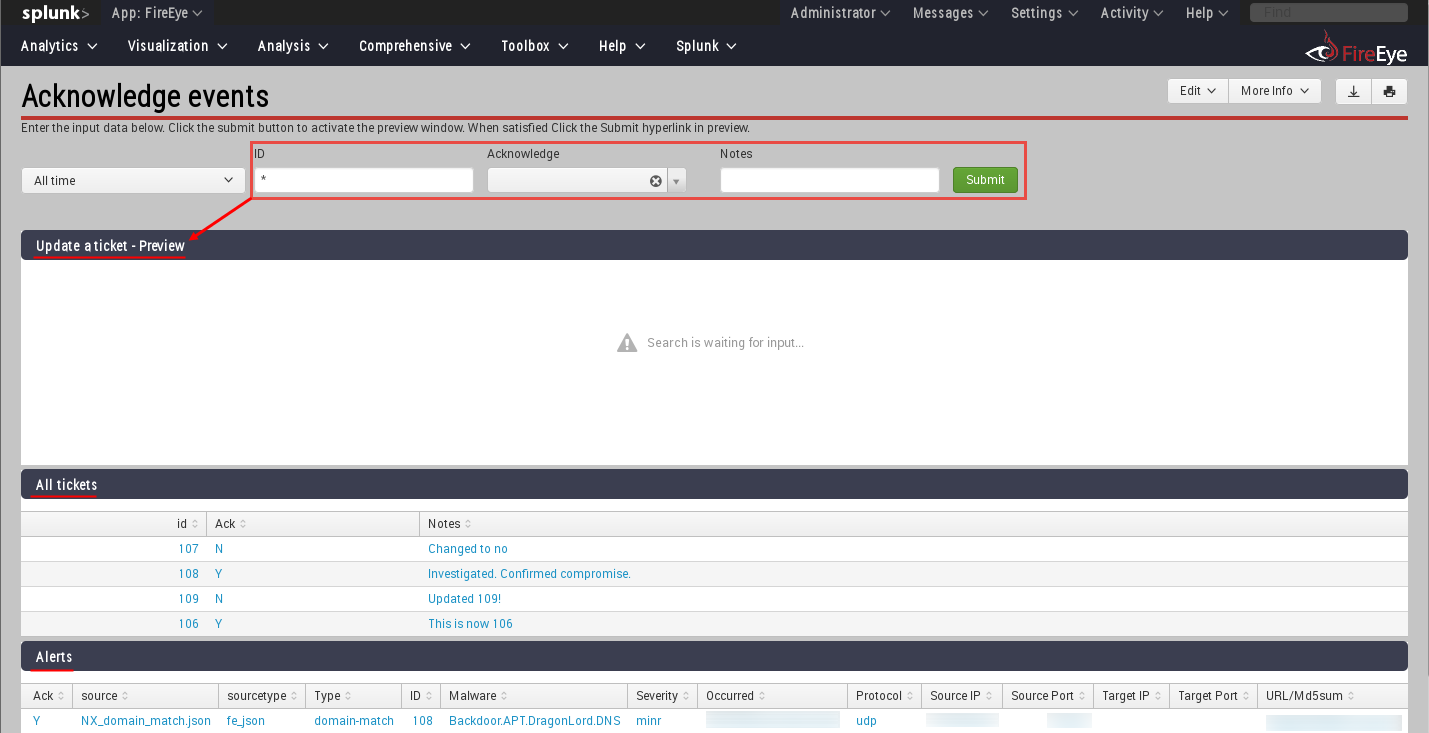
You could create an event acknowledgement page

Event acknowledgement page

Once the fields are filled in at the top with the event id, acknowledgement, and notes, it could create the command to either update or add a new entry to the KV Store.  Clicking the Submit hyperlink will actually run that command and modify the KV Store.

Event acknowledgement page filled out and waiting for click to submit

Once the data is populated in the KV Store, these records can be mapped to the original events to add this data for analysts.

Original event data with KV Store augmentation

Conclusion

Hopefully this helps expose some of the interesting possibilities of using Splunk's KV Store to create an event acknowledgement/ticketing system using search operations.  Feel free to leave feedback below--especially if there is an easier search operation for updating a record and adding a new one if it does not already exist.  Thanks for reading.

Sunday, May 8, 2016

Forensic Investigator Splunk App - Version 1.1.4

By Tony Lee


Introduction

Our last release, version 1.1.3 was a pretty exciting release with new tools such as the chat program, link extractor, and various monitoring tools.  This time we focused on adding host enumeration tools that can be useful when trying to discover information about a remote host.  In addition, we have added a bulk search option that allows users to search on a list of items such as MD5 hashes, IP addresses or URLs for example.  Here is what we have in store for you in version 1.1.4 which is now available for free via the Splunk App store.

High Level

New Features in v1.1.4
 - Updated Investigator Chat 2.0!
 - Added Ping tool (Host --> Ping)
 - Added SMB Share Viewer (Host --> SMB Share Viewer)
 - Added NetBIOS Viewer (Host --> NetBIOS Viewer)
 - Added Port scanner (Host --> Port Scanner)
 - Added Banner grabber (Host --> Banner grabber)
 - Added Bulk searching of data using any field (Toolbox -> Bulk Search - Wild)
 - Added Bulk searching of data using a specific field (Toolbox -> Bulk Search - Field)
 - Added ASCII Table cheatsheet (Toolbox -> Cheat sheets -> ASCII Table)
 - Added Ports and services cheatsheet (Toolbox -> Cheat sheets -> Ports and Services)
 - Added subnetting cheatsheet (Toolbox -> Cheat sheets -> Subnetting)

Maintenance in v.1.1.4
 - Renamed the xml files to increase simplicity

Investigator Chat 2.0

The chat program received a pretty slick upgrade that makes it much more functional and easier to use.  Big thanks to Kyle for that upgrade.  It now lacks the annoying 5 second refresh rate.


Host Tools

Secure environments will lock down command prompts and restrict access to certain tools--thus it can be useful to have some host enumeration tools that can be activated through Splunk to query remote hosts.

Ping Tool

This is the simplest tool to reach out and see if the host is alive.  The assumption is that ICMP is not blocked at the network or host.


SMB Share Viewer

It can be nice to check for Windows shares as well.  If run from Windows, it will use net view and will not see "hidden" shares (those that end in a $ sign, such as C$, ADMIN$, IPC$).  If run from Linux, it will use smbclient and will see hidden shares.


NetBIOS Viewer

It is also useful to be able to pull NetBIOS table information from a remote host to determine function, users, domain and more.


Port Scanner

Determining the open ports can also be useful for determining the function of a host.  Unfortunately, nmap or other port scanners may not always be available... so we provided a python based port scanner exposed through Splunk.


Banner Grabber

Taking it a step further, we added a python based banner grabber as well.  It should be able to pull most banners, but let us know if it struggles against a particular service.


Bulk Searching - Wild and specific field


Often we have a large list of MD5 hashes, IP addresses, or URLs to run through Splunk.  We could search one item at a time, but that is slow.  We could create a complex boolean statement, but that takes time.  How about just copying and pasting that list into a search field?  Perfect!  This has been tested with Chrome and Firefox which seems to work best.  The file should contain one search item per line.  When copied and pasted into the Splunk Search list field, the browser should separate the terms with spaces.  There are two versions, one which you must specify the field and one that will search all fields (wild).


Cheatsheets - ASCII table, Ports and services, Subnetting


Finally, everyone can use some cheatsheets.  Quick references such as an ASCII table, ports and services, and subnet information.  No more wasting time searching the Internet--especially if you are on a closed network.  These are now local references available in Splunk.


Conclusion

Hopefully you will enjoy the new features of the app.  As always, we appreciate the great feedback we are receiving.  Please send more ideas from within the app using Help --> Send Feedback.

Wednesday, November 25, 2015

Fun with Zigbee Wireless - Part III (Software)

By Tony Lee

Introduction

In our previous zigbee articles, we covered ZigBee usage, history, and one hardware option:
History:  http://securitysynapse.blogspot.com/2015/11/fun-with-zigbee-wireless-part-i.html 
Hardware: http://securitysynapse.blogspot.com/2015/11/fun-with-zigbee-wireless-part-ii.html


This time, let's explore some software options.  There are both free and commercial options available.  For this series, we focused on free (although some require email registration).  the following options are explored in this article:
  • Atmel AVR Tools - Free with email registration
  • Luxoft BitCatcher ZigBee Network Analyzer Tool - Free with email registration
  • Killerbee - Free on Github

Friendly reminder:  As always use this information responsibly.  Make sure you own the equipment prior to experimentation and learning.  We do not condone malicious intentions, are not held responsible for your actions, and will not bail you out of jail.

Atmel AVR Tools

This software is offered for free (http://www.atmel.com/tools/RZUSBSTICK.aspx) with email registration from the same maker as our RZUSBSTICK hardware.  It runs on Windows, including a Windows 7 virtual machine which is what our environment used.  Best of all, AVR tools works with the stock firmware so there is no need to flash the RZUSBSTICK.  Included in the download is the following:

  • Windows drivers
  • rfservicesserver.exe - Command line tool that creates a socket
  • AVR Wireless Services - GUI that connects to the socket created by rfservicesserver
The component architecture is shown below:

RF Services Server creates the bridge between the RZUSBSTICK hardware and the software to which the user interacts.  AVR Wireless Services Suite provides the UI for human interaction.


The screenshot above shows the software download on the left, rfservicesserver running in the command prompt on the top right, and AVR Wireless Services GUI running in the bottom right.  AVR Wireless Services provides packet history, a graphical node display, and a packet drill down feature similar to Wireshark.  Of course Atmel offers more capable software at a price, but this is not too bad of a start for a free offering.

Luxoft BitCatcher ZigBee Network Analyzer Tool

Luxoft offers a tool called BitCatcher (http://www.luxoft.com/embedded-systems-development/bitcatcher/) which is also free with email registration.  This tool runs in Windows (binary) and Linux (Java app).  The biggest downside is that it requires custom firmware to be loaded onto the RZUSBSTICK via a flash upgrade (will discuss in a later article).  The flash upgrade changes the hardware ID which allows a custom driver to convert USB to COM which BitCatcher then uses to interact with the hardware.

Our setup process was the following:

  • Flashed in Linux with avrdude (Will demo in a later article)
  • Ran the BitCatcher Sniffer tool in a Windows 7 VM
    • Loaded the "Sniffer" driver
    • Added the device, connected the device, started the sniffing


The software download is shown on the left and the BitCatcher software is shown on the right.  There is a packet timeline and drilldown functionality similar to Wireshark, but with less detail.

    Killerbee

    The last software we will mention is the Killerbee framework from Josh Wright and River Loop security.  Killerbee is a free download from github found here:  https://github.com/riverloopsec/killerbee.  Some tools work with the default Atmel firmware while some require Killerbee firmware.

    The tools that work with the default firmware:

    • zbid – List available devices
    • zbfind – GUI for Zigbee location tracking – Never got this working 
    • zbopenear - ZigBee/802.15.4 many channel listener (need 1 RZUSB per channel)
    • zbwireshark - Sends sniffed ZigBee packets to Wireshark via a named pipe
    • zbdump – tcpdump clone (libpcap or commercial Daintree SNA format)
    • zbconvert – Convert capture file formats (libpcap -> Daintree)
    • zbdsniff – Scans capture files for Zigbee encryption keys (takes a capture file)
    • zbgoodfind – Search a binary file to identify encryption key for encrypted packet

    The tools that require the killerbee firmware:
    • zbreplay – Replay network traffic from libpcap or Daintree files
    • zbscapy – scapy for ZigBee
    • zbkey – Attempts to retrieve a key by fake association and request/response
    • zbassocflood – Transmit a flood of associate requests to a target network
    Killerbee comes pre-installed with most Kali distributions, however your success will vary.  Here was our out-of-the-box experience:

    Kali 1.1:
    Exception: Unable to open device.  Ensure the device is free and plugged-in.


    Kali 2.0:

    usb.core.USBError: [Errno 110] Operation timed out

    The moral of the story here is that just because the tools are pre-installed, does not mean they will work.

    The github page recommends installing the latest version of the software anyway.  These are the steps we used in a Kali 2.0 installation:


    Setup:


    mkdir tools; cd tools
    git clone https://github.com/riverloopsec/killerbee.git
    apt-get install libgcrypt-dev
    cd killerbee
    python setup.py install

    sudo rm -rf /usr/lib/pymodules/python2.7/killerbee
    python setup.py install

    Conclusion

    This article outlined the software we will use to examine the 2.4 GHz ZigBee frequency range.  We are very appreciative for those who released free software--Atmel, Luxoft, Josh Wright and River Loop security.  Here are some general observations:

    • Atmel - Worked well and with default firmware
    • Luxoft - Worked well after the firmware upgrade and driver install
    • Killerbee - Most capable and diverse tool set by far, but had the some minor issues:
      • Some tools don't work well - but hey, they are free.
      • Most tools don't terminate well
      • Thus, after running a tool, it may be necessary to reseat the card
        • Easiest reseat method is to virtually reseat the card via VMware/Virtual box
        • If virtual reseat does not work, physical reseat will be necessary (hooray for USB stands)

    The next article will cover some potential passive attacks.